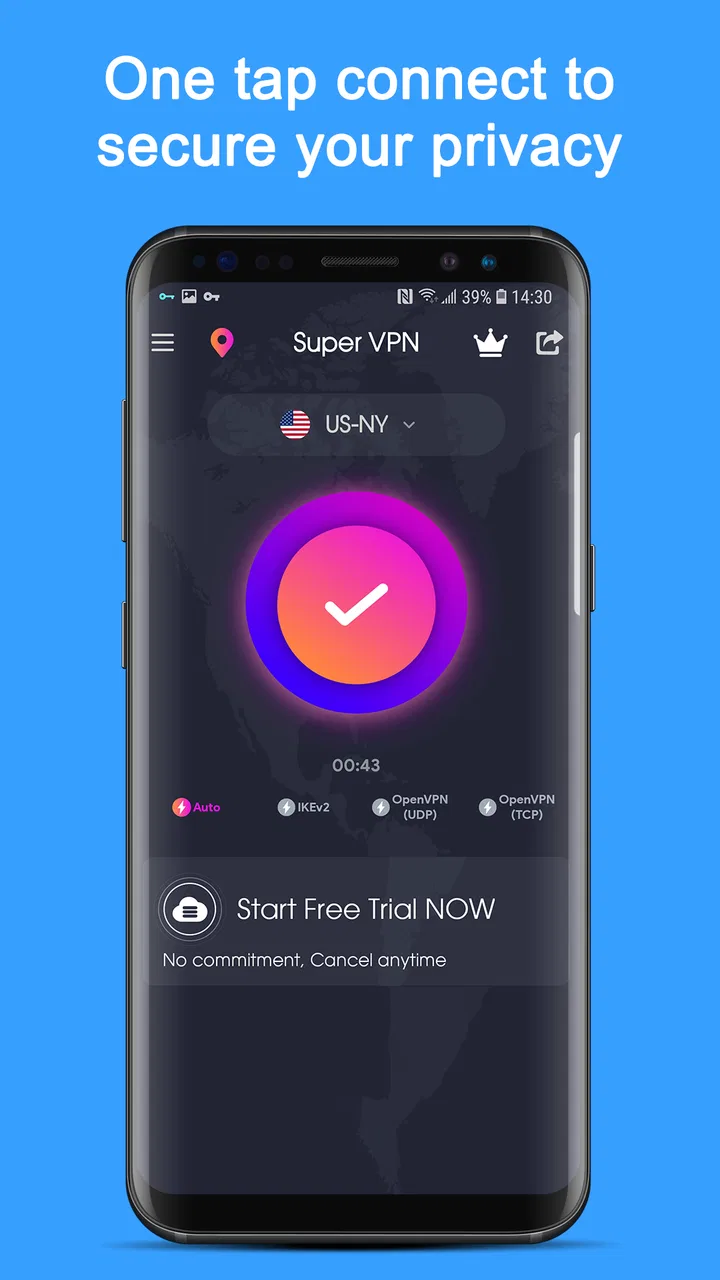
VPN Proxy Speed - Super VPN
- 4.9
- Rating
- 100.00M
- Installs
- Free
- Price

 Analysis by App-foxy
When I use a VPN, I am usually trying to solve one practical problem: I want a safer, less exposed connection when I am away from home, without turning the process into a technical project. VPN Proxy Speed - Super VPN is built around that simple idea. It is a free productivity app from TOPAPPS TECH PTE LTD, and its main appeal is the promise of a quick VPN proxy connection rather than a long list of advanced controls.
That focus matters. Many VPN apps try to look like complete privacy suites, while this one is easier to understand at first glance. I open it, look for the connection control, and think about whether the current network is trustworthy enough for what I need to do. In my experience, that makes it more approachable for casual users who want an extra layer between their phone and a public Wi-Fi connection.
The app has reached over 100 million installs and holds a 4.8 average from around 1.6 million ratings, which shows that the basic experience has attracted a very large audience. It is rated for Everyone, runs on Android 7.0 or later, and the current version is 4.5.5. Those details make it accessible to many older Android phones as well as newer devices.
You May Also Like

 Blood Strike: 2.5 Anniversary
Blood Strike’s Loadouts Turn Every Drop Into a Tactical Gamble
A close look at Blood Strike’s custom loadouts: how fast access to signature weapons reshapes its battle royale rhythm, rewards preparation, and narrows the gap between fights.

 Pandora - Music & Podcasts
Pandora’s Music Is Easy to Start, but Harder to Recover
Pandora’s strength is its low-effort path from a seed to a station. Its weak spot is how much confidence it asks you to place in connection, setup, and quiet recovery.

 8 Ball Pool
 Is Built on Rivalries, Rematches, and Routine
A close look at the rivalries, rematches, shared routines, and unanswered safety questions that turn a quick pool match into a persistent mobile community.

 Samsung Music
’s Quiet Strength Is Playing What You Already Own
Its reach comes less from spectacle than from dependable access to a personal library. That simplicity is both the app’s strongest retention engine and its ceiling.

 AccuWeather: Weather Radar
AccuWeather Review: A Quick, Clear Forecast for Everyday Decisions
For everyday plans, the best forecast is the one you can understand quickly. AccuWeather makes rain timing, radar, and local conditions easy to act on, with a few trade-offs.

 Hill Climb Racing
Why Hill Climb Racing Still Turns Crashes Into One More Run
A tiny car, a bumpy hill and one more upgrade: Hill Climb Racing keeps resurfacing because its simple chaos makes every near-miss feel personal.
More From Our News Desk
View All News


What the VPN capability actually changes
The most important capability here is the ability to route your connection through a VPN proxy instead of sending app traffic directly over the network you are using. In everyday terms, that can be useful when I am connected to Wi-Fi in a café, hotel, airport, library, or shared office. The connection is still not a magic shield, but it gives me a more private route than simply joining an unfamiliar network and carrying on as usual.
I would describe this app as a convenience-first VPN. It is aimed at getting a connection active with as little effort as possible. That is different from a service designed for people who want to fine-tune protocols, manage detailed routing rules, or build a carefully controlled privacy setup. If my priority is a quick connection before checking email or using a browser on public Wi-Fi, the simpler approach is a genuine advantage.
There is also an important distinction between privacy and anonymity. A VPN can help hide traffic from the local network operator, but it does not make me invisible to every website or app. Accounts, cookies, device identifiers, and the behavior of the apps I use can still connect activity to me. I would not install this expecting it to erase the need for sensible browsing habits, strong passwords, or cautious handling of personal information.
The word “speed” in the app’s positioning also needs a realistic interpretation. A VPN may feel fast enough for ordinary browsing, messaging, and routine work, but any VPN adds another step between the phone and the internet. Performance can vary with the network I start from, the route being used, congestion, and the distance to the selected connection point. I would judge it by whether it remains comfortable for my normal tasks, not by assuming that a VPN must improve every connection.
Starting a connection without overthinking it
The first-time experience is most useful when I treat it as a quick safety routine rather than a permanent switch. I connect only when I have a reason, check that the VPN indicator appears on the phone, and then continue with the task that brought me online. That small visual check is easy to skip, but it prevents the common mistake of assuming protection is active when the connection has not actually started.
For a person who has never used a VPN, the reduced number of decisions can be reassuring. There is less temptation to choose a complicated configuration without understanding it. On the other hand, experienced users may find that same simplicity restrictive. A straightforward interface is helpful only when it gives enough information to make a sensible choice about the connection.
I also recommend checking the phone’s battery behavior after installing any VPN app. A VPN normally needs to remain active in the background while it protects traffic, so users who are already struggling with battery life should pay attention to whether keeping it connected all day is worthwhile. My practical approach would be to use it for higher-risk networks and turn it off when I return to a trusted connection, unless I have a specific reason to leave it running.
Another useful habit is to reconnect after changing networks. Moving from home Wi-Fi to mobile data, or from one public hotspot to another, changes the situation even if the VPN icon remains visible. I would briefly check the connection after a transition instead of assuming that the previous session represents the new network perfectly.
A realistic day-to-day example
Imagine I am working from a hotel lobby between appointments. I join the available Wi-Fi because I need to send a document, review a work message, and sign in to a service. Before doing that, I open the app and activate the VPN. The benefit is not that the hotel network becomes trustworthy; it is that I am adding a protective layer before handling information on a network shared with many other guests.
Once the document is sent, I might notice that a video call or a large upload feels less responsive than expected. That is the point where I would make a practical decision: keep the VPN for sensitive browsing and messaging, or switch to mobile data for a time-sensitive task if the mobile connection is more reliable. The app is useful in this scenario because it gives me an easy option, but it does not remove the need to choose the right connection for the job.
This workflow also shows why I would not leave a VPN enabled blindly. If I am only reading downloaded notes on my phone, there is little reason to spend battery and connection overhead. If I am signing in over unfamiliar Wi-Fi, the case is stronger. The best results come from matching the tool to the situation rather than treating it as a universal answer.
Where the simple approach helps most
The strongest audience is people who want basic VPN protection without learning networking terminology. Students moving between campus hotspots, travelers using temporary Wi-Fi, and remote workers who occasionally work from cafés can all understand the value quickly. The app’s Everyone rating and support for Android 7.0 or later also make it a practical option for households with a mix of older and newer Android phones.
I can also see value for someone who has tried more complicated VPN services and stopped using them because setup felt like work. In that case, a simpler app may be more effective in practice simply because the person is more likely to open it and connect when needed. A protection tool that gets used consistently can be more useful than a sophisticated alternative that stays unconfigured.
There is a less obvious use case for troubleshooting as well. If a website or service behaves differently when the VPN is active, turning the connection off temporarily can help identify whether the route is affecting access. I would not interpret that behavior as proof that the app is broken. Some services react differently to VPN traffic, and the sensible response is to compare the connection states rather than repeatedly changing unrelated phone settings.
The trade-off between convenience and control
The main compromise is clear: the easier the app is to operate, the less likely it is to satisfy someone who wants detailed control. A specialist VPN may be a better choice if I need a specific location, advanced routing, a carefully documented privacy model, or extensive configuration options. I would also look elsewhere if my main goal were highly sensitive professional work that requires a service selected through a detailed security review.
Free access is another reason to examine expectations carefully. The app itself is free, but it includes in-app purchases ranging from $1.49 to $39.99 per item. I would check the available purchase choices inside the app before assuming that every convenience or upgrade is included at no cost. A free starting point is attractive, but the overall experience may be shaped by how the app presents optional purchases.
Advertising or upgrade prompts can also affect how comfortable the experience feels, even when the connection itself works well. I would be especially cautious about tapping quickly through screens during setup. With any free utility, I want to read what I am accepting, understand which button starts the connection, and avoid treating every prominent button as part of the protection process.
Privacy expectations deserve the same care. A VPN changes who can observe parts of the connection, but it does not automatically mean that every aspect of online activity is private. I would still use encrypted websites, avoid entering sensitive information into suspicious pages, and remember that the VPN provider becomes an important part of the trust chain. For highly private work, I would prefer a service whose policies and technical details I had personally examined in depth.
How it compares with ordinary alternatives
The most obvious alternative is using no VPN at all. That costs nothing and avoids extra battery use or possible speed changes, but it leaves me relying entirely on the security of the network and the services I visit. For a trusted home network and low-risk browsing, that may be enough for some people. On unfamiliar Wi-Fi, I would rather have the extra option available.
Another alternative is using mobile data instead of public Wi-Fi. Mobile data can be the cleaner choice when the signal is strong, the task is urgent, and I do not want to deal with VPN overhead. The drawback is that it may consume a limited data allowance or perform poorly indoors. This app is most useful when Wi-Fi is convenient but not fully trusted, not when mobile data is already the faster and more comfortable route.
Compared with a paid, feature-heavy VPN, this app’s appeal is the low barrier to entry. A premium service may offer a more carefully explained feature set, stronger account controls, or tools intended for demanding users. Super VPN is easier to approach, but I would not choose it solely because of a speed-oriented name or a high store rating. Those signals tell me it is popular and well received; they do not replace deciding whether its level of control suits my needs.
Small habits that make the app more useful
I would create a simple personal rule: connect before opening accounts or handling documents on a public hotspot, then disconnect when I leave that network. This keeps the app tied to a clear purpose and makes it easier to notice whether it is affecting battery life or connection responsiveness. It also reduces the chance of forgetting that a VPN is still active when I later troubleshoot an unrelated network problem.
I would avoid judging the app during a single congested connection. If browsing feels slow, I would first compare the same task with the VPN off, then try again later or on another network. That quick comparison separates a problem with the hotspot from a problem introduced by the VPN route. It is a more useful test than assuming either the app or the Wi-Fi is automatically responsible.
I would also keep the app updated through the normal store process. The current version, 4.5.5, is the version I would expect to see when evaluating the present experience, and updates can change interface behavior or compatibility. On an older phone, I would confirm that the device is running Android 7.0 or later before spending time troubleshooting installation or connection issues.
For families, the Everyone content rating makes the app broadly approachable, but I would still explain to younger users what a VPN does and does not do. It can add privacy on a network, yet it cannot decide whether a website is safe, prevent every scam, or replace parental guidance. That short explanation is more valuable than presenting the VPN as an all-purpose security product.
Who should use it and who should skip it
I would recommend this app to someone who wants a free, uncomplicated way to add a VPN connection during travel or occasional public Wi-Fi use. It is particularly suitable for people who value a short setup process and do not need to manage technical details. The large user base and strong average rating suggest that this straightforward approach works for many ordinary Android users.
I would hesitate to recommend it to someone who needs a specific server choice, advanced privacy controls, or a service selected for demanding professional requirements. That person should compare specialist VPN providers carefully instead of assuming that a simple proxy app will cover every need. I would also skip it if I never use public networks and am unwilling to tolerate even minor changes in speed, battery use, or app behavior.
My overall view is favorable but measured. VPN Proxy Speed - Super VPN makes the most sense as an accessible, on-demand layer for everyday Android use. Its real strength is not that it transforms the internet into a perfectly private space; it is that it lowers the effort required to make a more cautious connection choice. Used with realistic expectations, it can be a handy companion for public Wi-Fi. Used as a substitute for secure habits or careful service selection, it will disappoint.
The developer, TOPAPPS TECH PTE LTD, has positioned this Productivity app around convenience, and that is exactly how I would approach it. I would install it for those moments when a shared network makes me uncomfortable, test how it behaves on my own phone, and keep it only if the balance between simplicity, performance, and purchase prompts feels right. Its best feature is the practical decision it makes easier: adding a VPN layer before a risky connection becomes a problem.
FAQs for VPN Proxy Speed - Super VPN
01What platforms does VPN Proxy Speed - Super VPN support?
VPN Proxy Speed - Super VPN is compatible with both Android and iOS devices. It offers easy installation and setup on smartphones and tablets, ensuring a seamless experience across different mobile platforms. Users can enjoy secure browsing and fast connection speeds regardless of their chosen operating system.
02Is VPN Proxy Speed - Super VPN free to use?
VPN Proxy Speed - Super VPN offers a free version with basic features, allowing users to get started without any cost. However, for enhanced features such as faster speeds, more server locations, and ad-free browsing, users can opt for a premium subscription. The app provides flexible pricing plans to cater to different user needs.
03How does VPN Proxy Speed - Super VPN ensure user privacy?
VPN Proxy Speed - Super VPN prioritizes user privacy with military-grade encryption protocols. It hides your IP address, ensuring anonymous browsing. The app does not log user activity, meaning your online actions remain private. This is crucial for users concerned about data security and privacy while using public Wi-Fi or accessing sensitive information.
04Can VPN Proxy Speed - Super VPN bypass geographical restrictions?
Yes, VPN Proxy Speed - Super VPN can bypass geographical restrictions, allowing access to content that may be blocked in your region. By connecting to various server locations worldwide, users can unlock streaming services, websites, and apps that are otherwise unavailable due to regional limitations.
05Does VPN Proxy Speed - Super VPN affect internet speed?
While using any VPN can potentially impact your internet speed due to encryption processes, VPN Proxy Speed - Super VPN is designed to minimize such effects. It offers optimized servers for fast connections, ensuring smooth streaming and browsing experiences. Users can select the best available server to maintain optimal speed.
Pros
- Fast connection speeds ensure smooth browsing.
- Easy-to-use interface for beginners.
- No registration required for quick access.
- Wide range of server locations available.
- Supports multiple devices simultaneously.
Cons
- Limited features in the free version.
- Occasional connection drops.
- Ads can be intrusive at times.
- No dedicated support for streaming services.
- Privacy policy lacks detailed transparency.

VPN Proxy Speed - Super VPN
Gallery